'%20d='M300%20636%20L495%20676%20L428%20998%20L340%20904%20L208%20970%20Z'/%3e%3cpath%20fill='url(%23r)'%20d='M724%20636%20L529%20676%20L596%20998%20L684%20904%20L816%20970%20Z'/%3e%3cpath%20fill='url(%23g)'%20d='M512.0%20130.0%20Q572.9%2086.0%20612.3%20149.9%20Q685.3%20132.6%20697.3%20206.7%20Q771.4%20218.7%20754.1%20291.7%20Q818.0%20331.1%20774.0%20392.0%20Q818.0%20452.9%20754.1%20492.3%20Q771.4%20565.3%20697.3%20577.3%20Q685.3%20651.4%20612.3%20634.1%20Q572.9%20698.0%20512.0%20654.0%20Q451.1%20698.0%20411.7%20634.1%20Q338.7%20651.4%20326.7%20577.3%20Q252.6%20565.3%20269.9%20492.3%20Q206.0%20452.9%20250.0%20392.0%20Q206.0%20331.1%20269.9%20291.7%20Q252.6%20218.7%20326.7%20206.7%20Q338.7%20132.6%20411.7%20149.9%20Q451.1%2086.0%20512.0%20130.0%20Z'/%3e%3ccircle%20cx='512'%20cy='392'%20r='224'%20fill='%23FFF6D6'/%3e%3ccircle%20cx='512'%20cy='392'%20r='192'%20fill='url(%23c)'/%3e%3c/svg%3e)
Managing Admin Accounts
Today, we would like to introduce two new features focused on administrators and their permissions. Both are available to Cortado MDM customers with a PRO subscription. Add additional administrators to the management portal With this update, you have the option to add or remove new admins to your organization at the touch of a button. Even if you are responsible for managing multiple organizations, you can now quickly and easily assign or remove administrators in a new view...
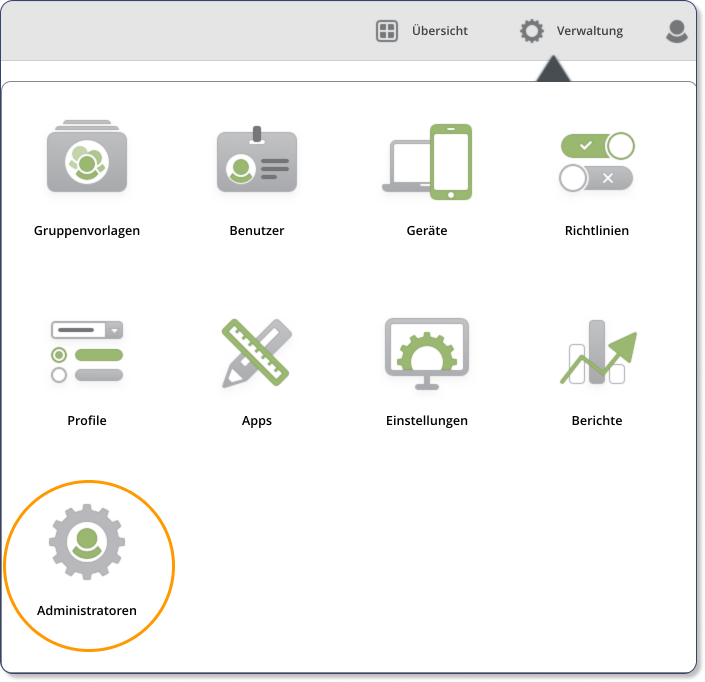
Today, we would like to introduce two new features focused on administrators and their permissions. Both are available to Cortado MDM customers with a PRO subscription.
Add additional administrators to the management portal
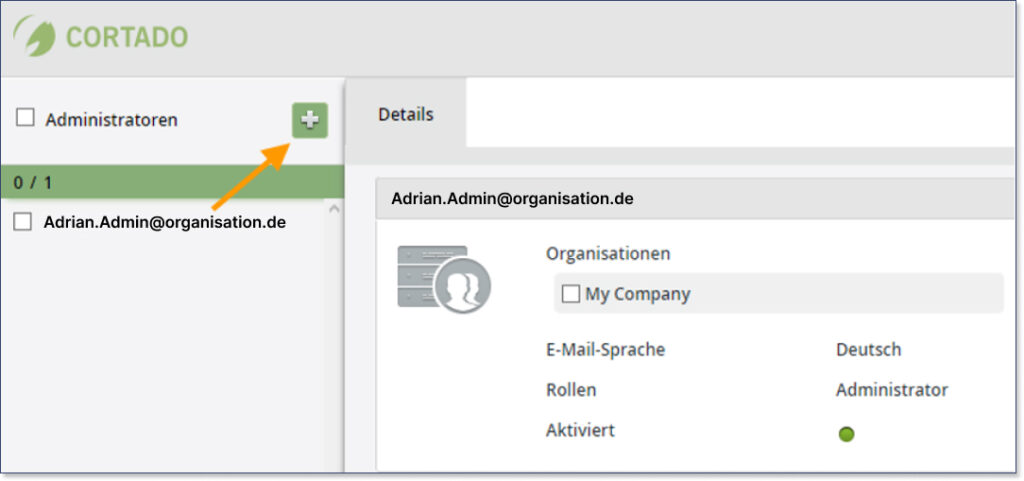
With this update, you have the option to add or remove new admins to your organization at the touch of a button. Even if you are responsible for managing multiple organizations, you can now quickly and easily assign or remove administrators in a new view within the management portal.
Managing admin accounts and roles
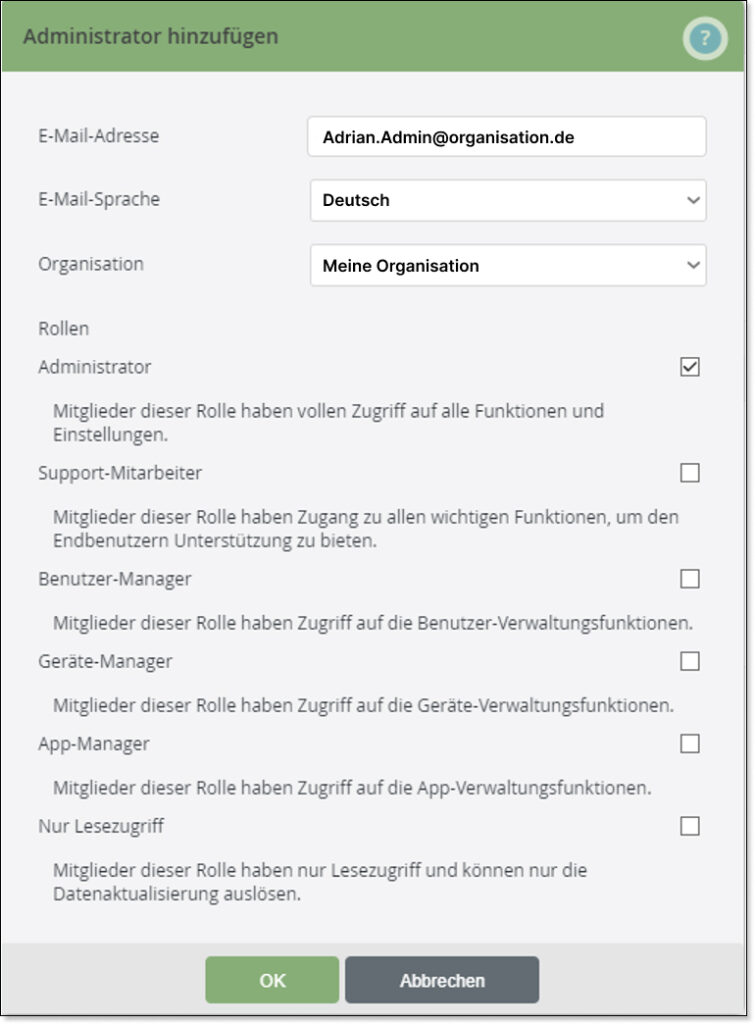
In addition to adding and removing new administrators, we have also defined new roles to help you delegate responsibilities within your team more effectively. These new roles are App Manager, User Manager, Device Manager, and Support Staff. A read-only role is also available. More information on the individual roles and setup instructions can be found in our Knowledge Base under How to add additional administrators for Cortado MDM.
Now available in Cortado MDM - have you tried it yet?
Overall, you can expect fast management of admin roles with Cortado and the ability to individually define the responsibilities of each administrator.
Not using Cortado MDM yet? Then find out about our free trial offer on our website: Try for free - Cortado MDM

Not a Cortado customer yet?
Test Cortado MDM for free and without obligation!
Try for free now