'%20d='M300%20636%20L495%20676%20L428%20998%20L340%20904%20L208%20970%20Z'/%3e%3cpath%20fill='url(%23r)'%20d='M724%20636%20L529%20676%20L596%20998%20L684%20904%20L816%20970%20Z'/%3e%3cpath%20fill='url(%23g)'%20d='M512.0%20130.0%20Q572.9%2086.0%20612.3%20149.9%20Q685.3%20132.6%20697.3%20206.7%20Q771.4%20218.7%20754.1%20291.7%20Q818.0%20331.1%20774.0%20392.0%20Q818.0%20452.9%20754.1%20492.3%20Q771.4%20565.3%20697.3%20577.3%20Q685.3%20651.4%20612.3%20634.1%20Q572.9%20698.0%20512.0%20654.0%20Q451.1%20698.0%20411.7%20634.1%20Q338.7%20651.4%20326.7%20577.3%20Q252.6%20565.3%20269.9%20492.3%20Q206.0%20452.9%20250.0%20392.0%20Q206.0%20331.1%20269.9%20291.7%20Q252.6%20218.7%20326.7%20206.7%20Q338.7%20132.6%20411.7%20149.9%20Q451.1%2086.0%20512.0%20130.0%20Z'/%3e%3ccircle%20cx='512'%20cy='392'%20r='224'%20fill='%23FFF6D6'/%3e%3ccircle%20cx='512'%20cy='392'%20r='192'%20fill='url(%23c)'/%3e%3c/svg%3e)
Enhanced Cortado Apps and New User Portal
A new update for Cortado MDM has arrived. This time, there are many improvements to the Cortado apps and a new user portal. Here is a summary of the most exciting changes.
A new update for Cortado MDM has arrived. This time, there are many improvements to the Cortado apps and a new user portal. Here is a summary of the most exciting changes.
Overview
Cortado App - New and improved for iOS and Android
Cortado App - Now supports Android work profiles on company-owned devices
New User Portal - Easy enrollment for all management modes
Updated Android Policy Dialog
Enhanced Device Enrollment Menu
iOS/iPadOS - Disable MAC Address Randomization
Further improving user-friendliness for our end users was the top priority on our roadmap.
That is why we didn't stop at providing quality improvements for MDM administrators; in this update, we also optimized many functions for end users and expanded their own management options. We expect that this increased autonomy for employees will also significantly reduce the administrative workload for IT admins.
Cortado App - New and improved for iOS and Android
Our Cortado app for Android devices offers a simple and user-friendly way to enroll and manage smartphones and tablets.
With the Cortado app, it only takes a few minutes to set up a work profile on a device and separate corporate data from private data. The app also allows users to easily manage their own apps, remotely wipe data if a device is lost, and much more.
With this update, it is now possible to use this great feature with iPhones and iPads as well. Our specialized BYOD app (simply called BYOD) is now available in the App Store for iOS and iPadOS. It offers an extremely simple, secure, and transparent way for users to enroll and manage their personal devices as part of a "Bring Your Own Device" program.
Fast and Transparent BYOD for iPhones and iPads - How it works
The Cortado BYOD app is now the ideal solution for using private iPhones and iPads for work.
We built the app on the principle that end users should always maintain control over their privacy and data. Users can set up and manage their devices independently without having to hand their device over to an administrator.
The app also offers a high level of transparency. Users see exactly what is being managed on their device and have intuitive ways to check compliance status, install apps, and unenroll.
After downloading the app, users simply scan a QR code to start the registration. Together with the new User Portal, the app guides users through a very fast and simple registration process.
Within a few minutes and clicks, devices have the configurations they need to be securely managed.
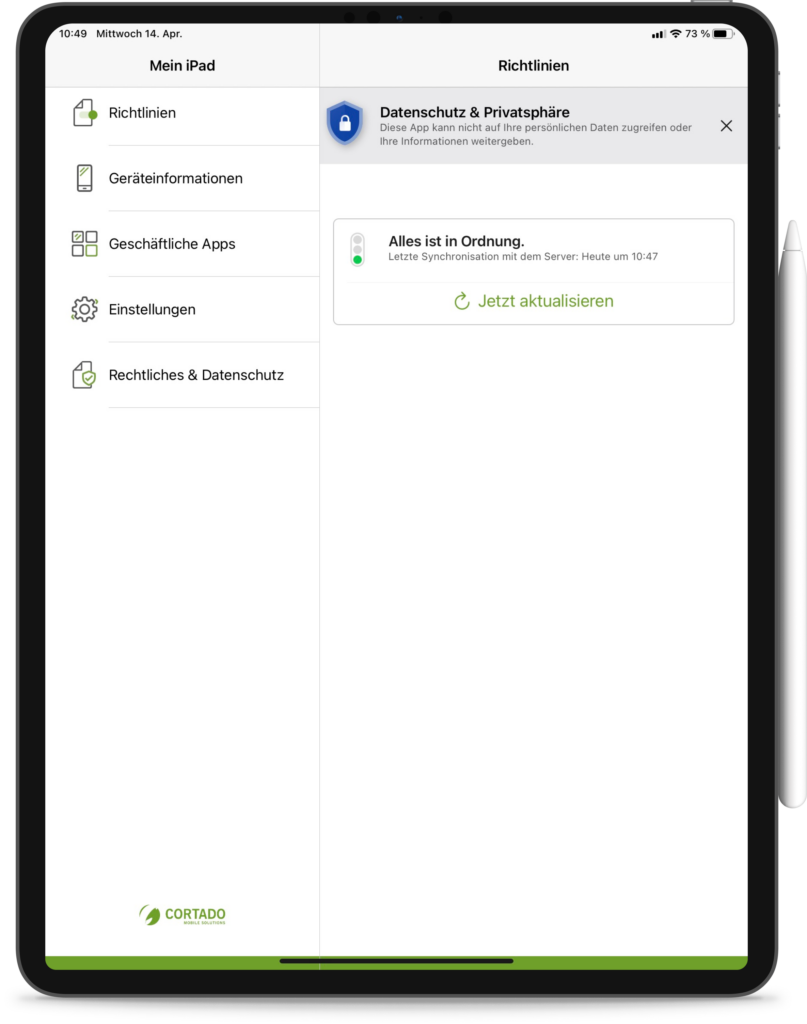
Once a device is enrolled, users have access to the app dashboard. From here, they can see the device status and keep an eye on other app functions and information regarding their device management.
The app also has several useful features for users. For one, there is manual server synchronization, which users can trigger if needed to check their device's compliance status. For example, a red status indicator shows them if a critical update or a required app is currently missing.
Access an Enterprise App Store directly from the app
When users want to install a managed app on their BYOD device, they don't have to open a web browser on a laptop or smartphone first - they can now do it directly from the app.
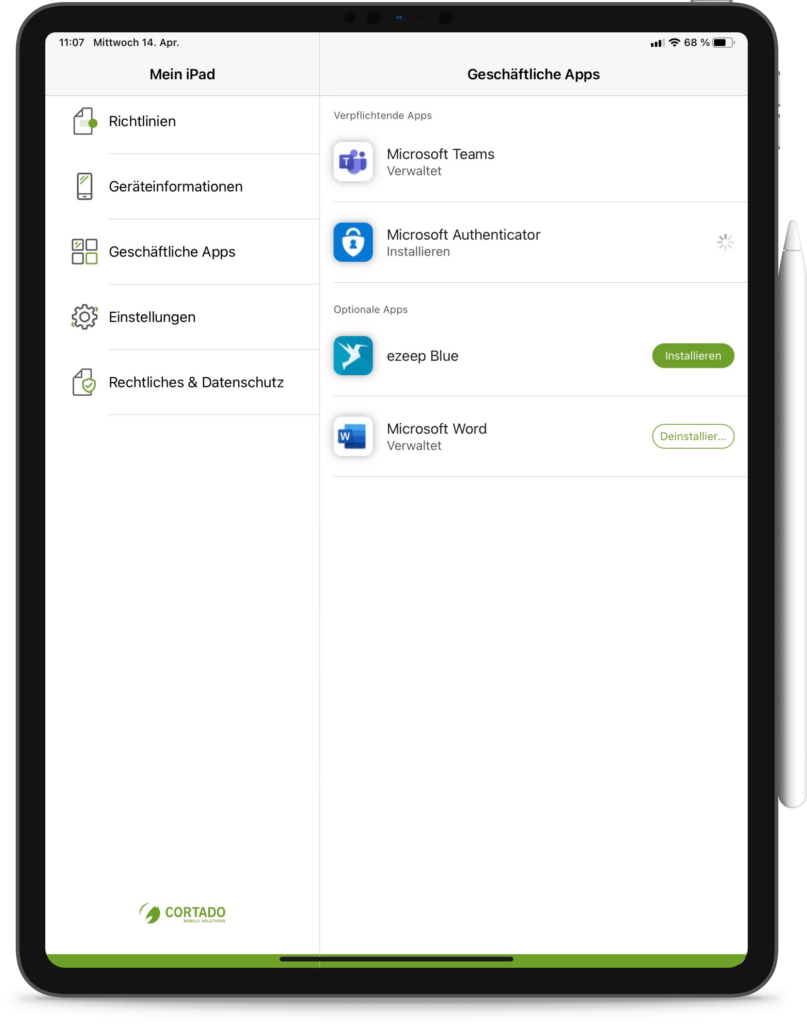
By switching to the "Business Apps" tab, users can view their own corporate app store. Here they see all the business apps assigned to them by their company. The apps are also divided into two groups - mandatory and optional. Users can easily install and uninstall their apps independently and have a clear overview of all managed apps on the device. This last point is particularly useful on iOS devices, where managed apps are not always easy for users to identify.
To discover all the app's features, visit BYOD with the best protection for privacy and corporate data
Cortado App for Android - Now supports Android work profiles on company-owned devices
Our Cortado app for Android devices has also received further improvements and is now a comprehensive management app for all types of enrollment modes.
In addition to BYOD and Corporate Owned, Business Only (COBO) enrollment modes, the Cortado app now supports "Work Profiles on Company-Owned Devices" (aka COPE) from Android 11 onwards.
COPE allows personal use of company-owned devices while ensuring privacy and security compliance for IT administrators. This represents a real alternative to BYOD scenarios and enables the secure use of a single corporate device for both professional and private purposes.
New User Portal - Easy enrollment for all management modes
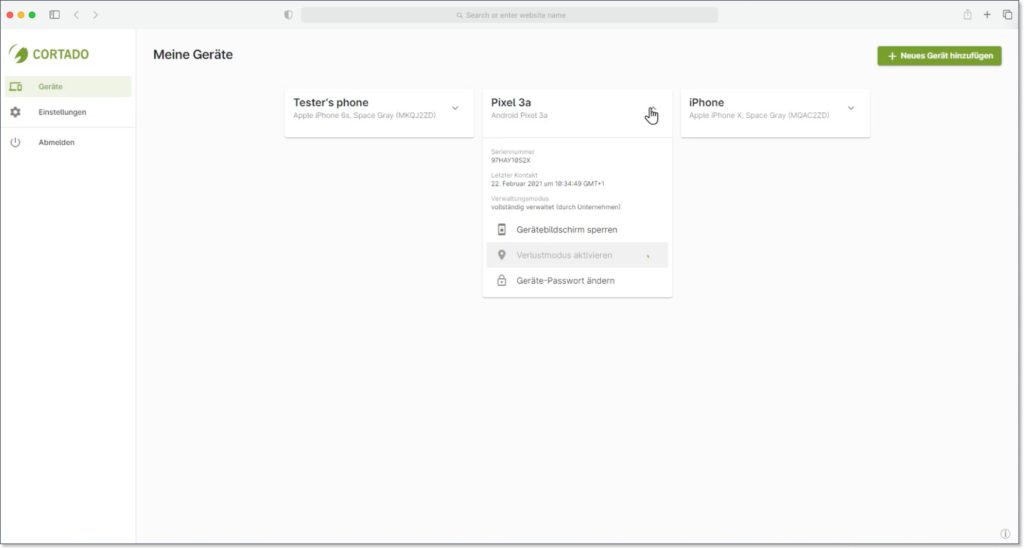
In addition to our mobile device management apps, we have also completely redesigned the User Portal - the central hub for all users and all types of device enrollments, accessible online via any standard web browser.
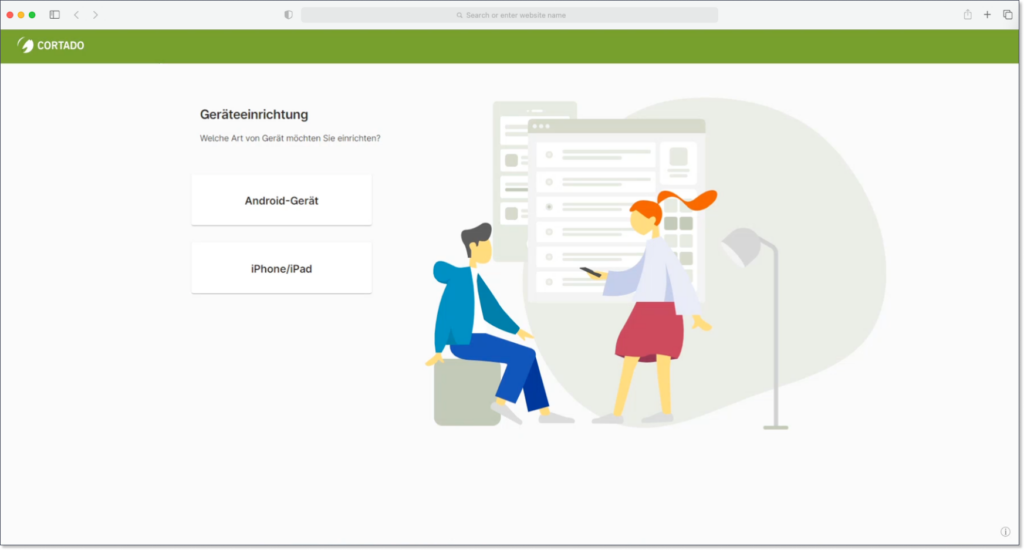
Like the BYOD enrollment app, the new User Portal is designed to be very accessible for end users. It guides users step-by-step through each individual registration process. End users can easily set up their work devices using simple instructions for every registration method, whether for private or company-owned devices. We have also expanded the support area and created new pages tailored to end users that explain the basics of device enrollment.
Users can see all devices currently being managed in the User Portal - great if they have more than one managed device in use. Depending on the enrollment mode, users have access to various functions, such as locating the device, activating lost mode, and managing their device passwords.
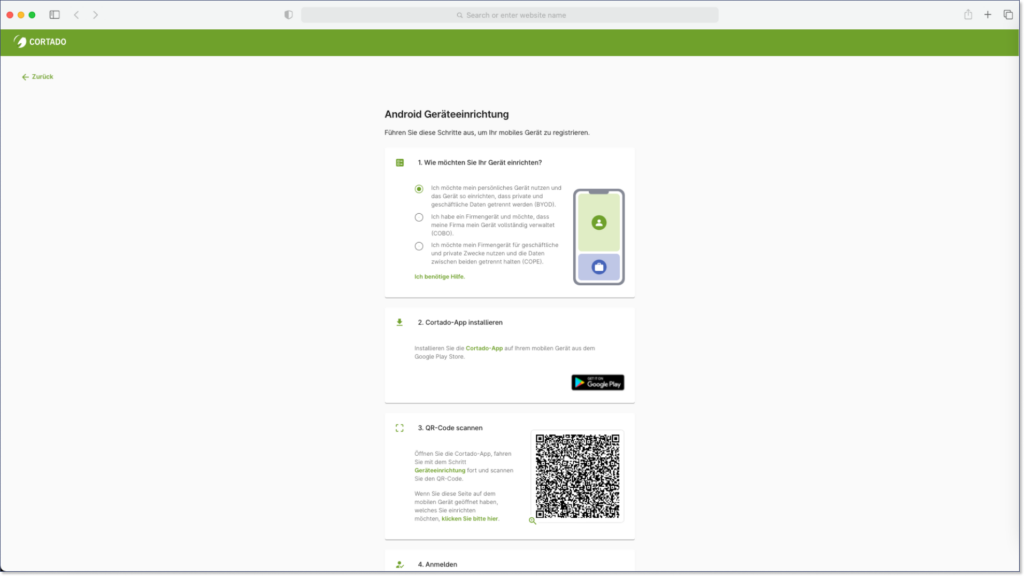
Since the User Portal is accessible from any standard web browser, it can also be used without the mobile device. For example, if users want to remotely lock a device or delete a work profile, the User Portal is the ideal tool.
Updated Android Policy Dialog
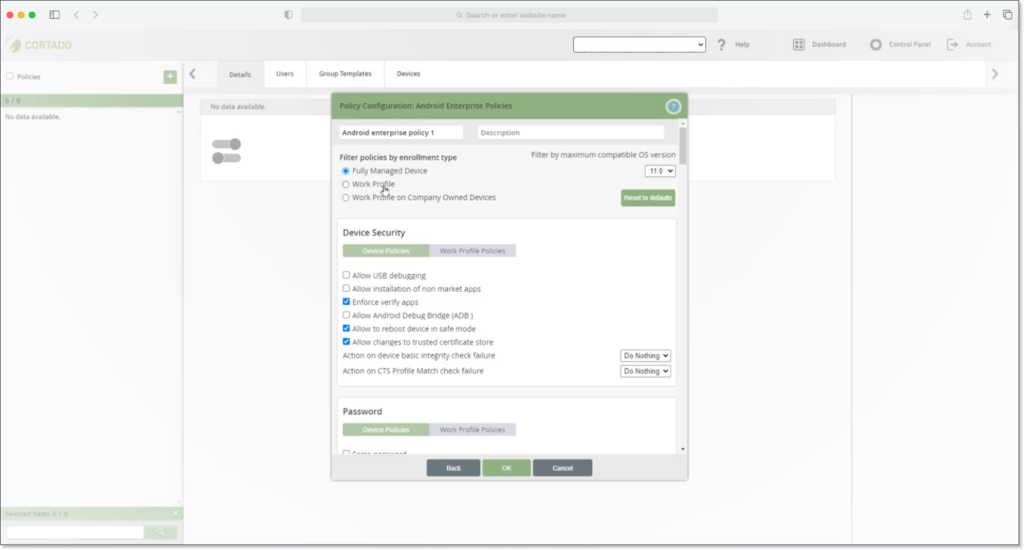
In addition to improvements for end users, we have also made changes to the admin portal to allow administrators to manage devices more quickly and intuitively.
Among other things, we have re-evaluated and improved our policy menu for Android devices. It is now possible to filter by device and work profile policies. Policies are now grouped by enrollment type: work profile, fully managed device, and work profile on company-owned devices. This new structure also provides administrators with the necessary space for policies reflecting COPE management modes. Additionally, a new feature has been added that allows selected apps to be hidden in Kiosk mode.
Enhanced Device Enrollment Menu
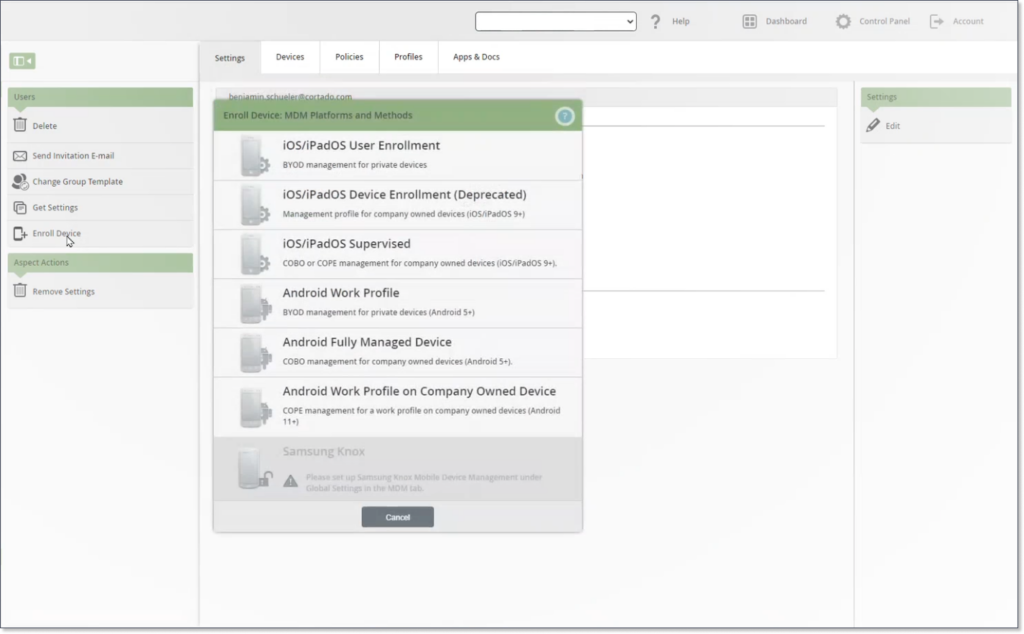
The Cortado MDM admin portal now lists all supported management modes, allowing administrators to start all device enrollments from a single window.
iOS/iPadOS - Disable MAC Address Randomization
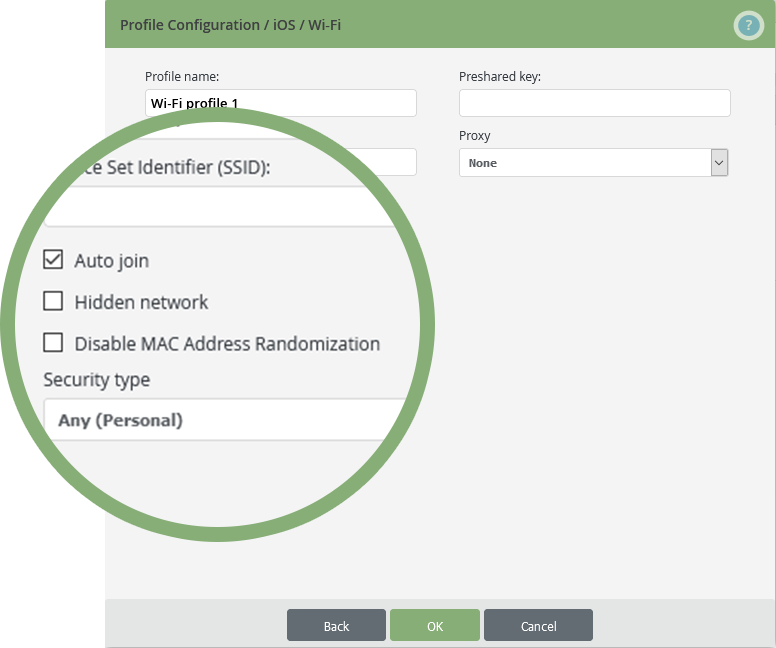
With this new update, it is now possible to disable MAC address randomization. Generating random hardware addresses has become common on iOS and Android to increase user privacy. However, in corporate networks, this can lead to issues identifying devices. Therefore, Cortado MDM now offers the option to disable this feature on iOS and iPadOS.
Cortado MDM is full of new features - get started now!
Already using Cortado MDM? The new update has already been rolled out.
Not yet using Cortado MDM? If you would like to test Cortado MDM for free without obligation, you can find more information and sign up for your free trial here: Free Trial - Cortado MDM
Need help with something else? Our team is happy to answer your questions: Contact - Cortado Mobile Solutions

Not a Cortado customer yet?
Test Cortado MDM for free without obligation!
Test for free now